Building production-style infrastructure from a 10-inch rack.
Computer Systems Technician student at Conestoga College. My home lab runs Proxmox, TrueNAS, and a UniFi network stack. It handles media, file storage, DNS, and DHCP for the household, with compute and storage on separate machines.
How this started
I'm in Term 3 of the Computer Systems Technician – IT Infrastructure and Services program at Conestoga College. My focus this term is networking, server administration, and Linux.
The lab runs services my household actually uses: media, file storage, DNS, and DHCP. Storage is ZFS with scheduled snapshots. Core network services live in VMs, not on the router.
It's where I take what class covers and put it into something that has to keep working. I built and maintain everything on this page.
Two boxes, one 10″ rack, four VLANs
Compute and storage are on separate boxes for the same reason enterprises split them. Either one can fail or get upgraded without touching the other.
TrueNAS SCALE
| pool | ZFS mirror, online |
| drives | 2 × 8TB IronWolf |
| shares | SMB + NFS |
| apps | Jellyfin + Nextcloud (Docker) |
| snapshots | scheduled |
| stores | file shares · website files |
Proxmox VE
- piholeDNS + ad blocking
- rocky-dhcpretired · DHCP moved to CGMax natively
- unifiretired · CGMax's own console now manages this directly
- nginx-proxyTLS, 7 sites · cloudflared
- wazuhSIEM · log aggregation
- grafanametrics · Prometheus pending
- trackerNutrition & Fitness Tracker
Proxmox VE
- docker-appsDocker + Dockge
Runs Nextcloud and Homepage, self-hosted file sync and a network status dashboard.
VLAN segmentation
No inbound ports forwarded
No inbound ports are forwarded. Public services are exposed through outbound Cloudflare Tunnels; Zero Trust policies decide who gets in.
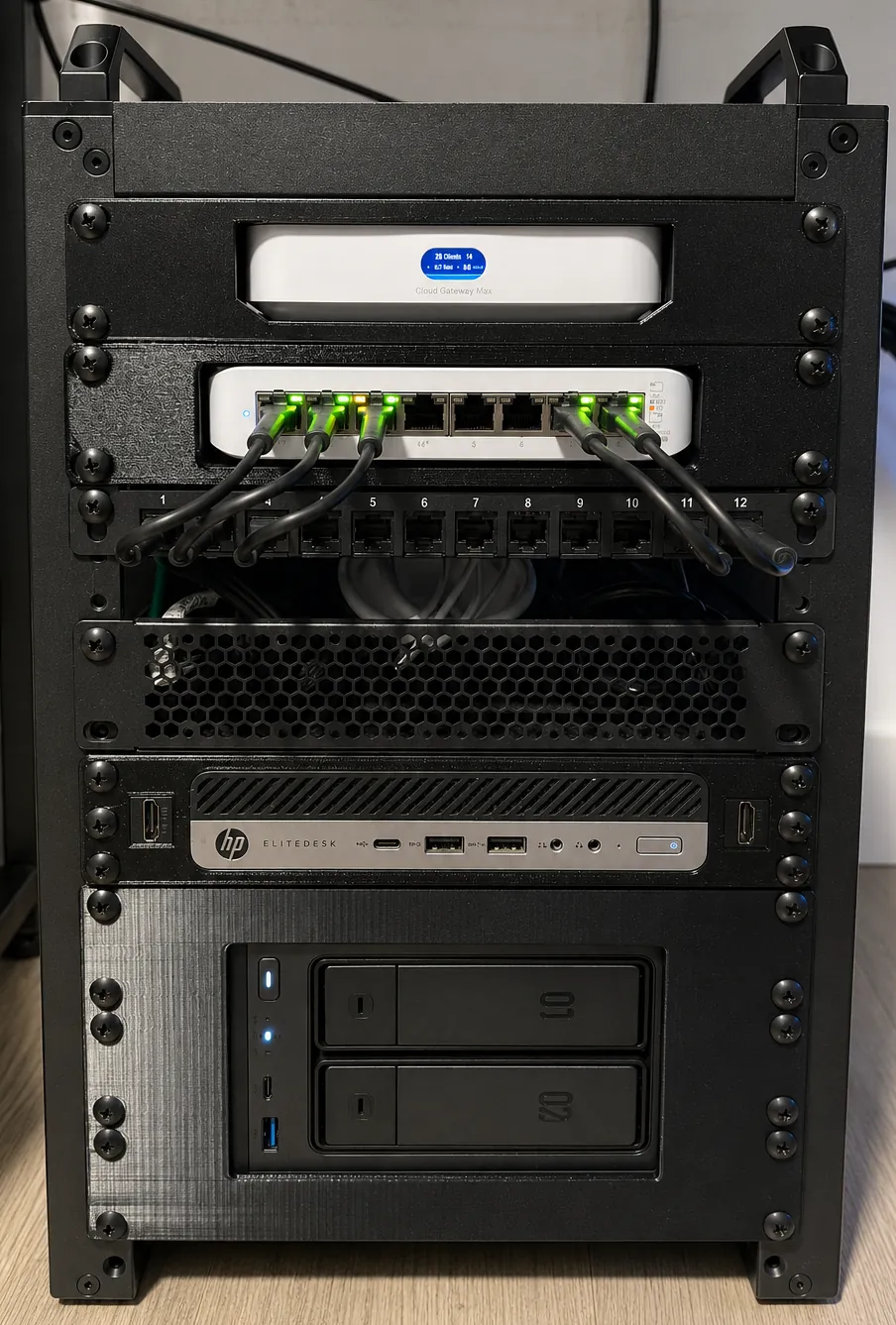
DeskPi 10″ rack
Everything mounted, labeled, and cabled so problems are easy to trace.
UniFi Protect
G4 Instants record on-prem with 15-day retention, on the IoT VLAN. Footage is stored on the Cloud Gateway Max's M.2 SSD.
Documentation
I document builds and fixes as I go. If I can't explain a config choice, it doesn't ship.
Traffic flow
How external traffic reaches self-hosted services without opening inbound router ports.
What it runs
| Service | What it does | Runs on |
|---|---|---|
| Jellyfin | Media streaming for the household. Movies, shows, music, no subscriptions. | truenas |
| Pi-hole | Network-wide DNS with ad and tracker blocking for every device | proxmox |
| DHCP | Address leasing served natively by the Cloud Gateway Max, not Rocky Linux | cgmax |
| Nginx reverse proxy | Clean hostnames and TLS termination. Fronts seven sites: dylanbpf.com, portal, tracker, watch, clientcentredcare.com, rcworldadventures.com, files.dylanbpf.com. | proxmox |
| UniFi Network | Retired as a VM. The Cloud Gateway Max's own built-in console manages the gateway, switch, and AP directly. | proxmox |
| Nextcloud | Private file hosting and sync, reachable at files.dylanbpf.com | docker-apps |
| Fitness Tracker | Nutrition & fitness logging app for myself and friends, workouts, food, calorie/protein goals | proxmox |
The plan & the real thing
On the left, the annotated build. The U7-Pro-Max AP is called out too, though it lives on a ceiling elsewhere in the house and won't show up in a photo of the rack itself. Hover or tap a dot to see what each device runs. On the right, the rack as built.
Why the cameras sit on their own VLAN
Before segmentation, every device shared one broadcast domain, cameras included. After, IoT traffic is walled off at the gateway.
Currently on the bench
What's running, and what's still on the shelf.
-
complete
TrueNAS and Proxmox onlineBoth hosts are up and running. The ZFS mirror is healthy, snapshots are scheduled. I'm now building out and documenting the service stack on top.
-
complete
Proxmox VM stack: Pi-hole, Nginx, Wazuh, GrafanaCore network and security services each run in their own VM: DNS filtering, the Nginx reverse proxy, Wazuh SIEM, and Grafana dashboards. Prometheus is still being wired up as Grafana's metrics source. The Rocky Linux DHCP and UniFi controller VMs were built here too, then retired (see below).
-
complete
Cloud Gateway Max online, VLANs liveThe Cloud Gateway Max is the LAN router at 10.0.1.1. Lab, IoT/Cameras, and Guest are segmented on their own VLANs, tagged per switch port and firewalled at the gateway.
-
complete
Double NAT resolved, Rogers modem in bridge modeThe ISP modem now just bridges the connection instead of routing; the Cloud Gateway Max handles routing, NAT, and the public IP directly. Cleaner path for port forwarding, VPN, and the Cloudflare Tunnel.
-
complete
Nextcloud running in Docker, published via Cloudflare TunnelFile sync and hosting alongside Jellyfin on the NAS, published externally through dylanbpf.com's Cloudflare Tunnel with a Zero Trust access policy applied.
-
complete
Rocky DHCP and UniFi controller VMs retiredBoth proved redundant once the Cloud Gateway Max handled DHCP and adoption natively. Powered off after confirming nothing depended on them.
-
complete
Second Proxmox node: Nextcloud and Homepage liveA mini PC running Docker and Dockge now hosts Nextcloud, self-hosted file sync at files.dylanbpf.com, and Homepage, a dashboard for the whole lab's status at a glance.
-
planned
Windows Server / Active Directory lab on ProxmoxDomain controller, users, GPOs. Built, documented, then torn down.
What I work with
Education
Conestoga College
Network security and ethical hacking this term. Cloud security and a capstone come in later terms. Everything I learn goes into the lab.
Sites built & hosted here
Sites I built and host on my own infrastructure, fronted by the same Nginx + Cloudflare Tunnel setup described in The Lab.
Client Centred Care
A care agency offering respite, ADL, and staffing support for clients with autism, dual diagnosis, ADHD, physical disabilities, and other complex care needs.
RC World Adventures
An outdoor RC park: race cars on the track, crawl trucks up dirt terrain, or dig for gems with an RC digger and trade them in for prizes.
Nutrition & Fitness Tracker
A tracker I built for myself and friends. Logs workouts, supplements, and food with built-in calorie and protein goals, daily reminders, and several workout splits to help you stick to a routine.